Complete Guide on ChatGPT Store (Unleash The Power of GPT’s )
Table of Contents
The ChatGPT Store Launch Announcement
Introduction
Hey there! Exciting news from OpenAI! The long-awaited ChatGPT Store has finally been launched, and we’re here to give you all the details. This store offers a platform for developers to monetize their AI models by creating and selling chat-based applications.
Whether you’re a developer looking to sell your own creations or a user in search of innovative chat-based applications, the ChatGPT Store is the place to be.
Overview of the ChatGPT Store
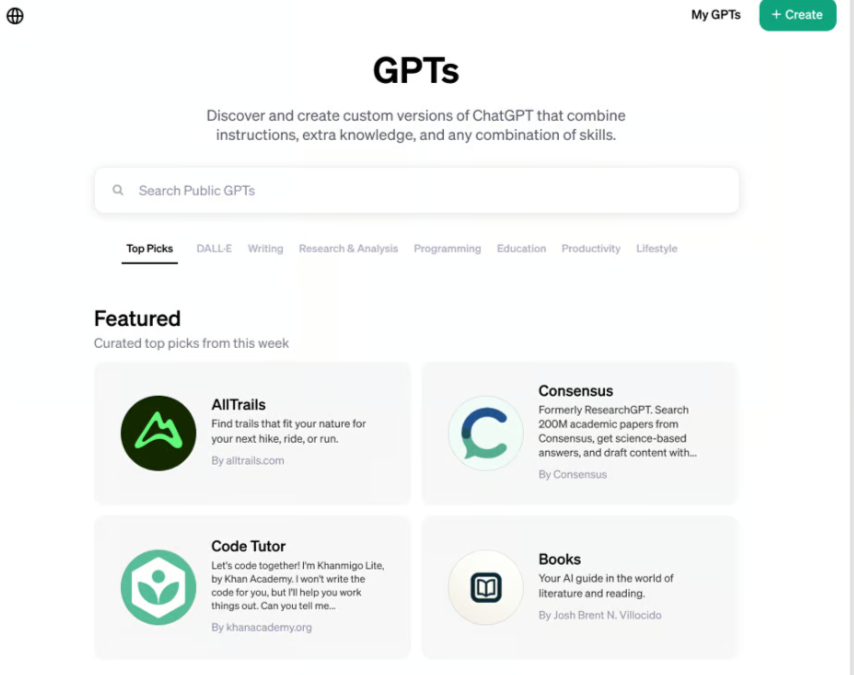
The ChatGPT Store is a centralized marketplace where users can browse and purchase a wide range of chat-based applications. OpenAI will feature and curate specific GPTs each week, selecting popular and trending ones for users to explore.
The store covers various categories, including writing, productivity, programming, lifestyle, and more, offering something for everyone.
Benefits and features of the ChatGPT Store
The ChatGPT Store brings several benefits and features to both developers and users. For developers, it offers an opportunity to monetize their AI models and generate revenue. OpenAI plans to launch a GPT Builder Revenue Program in the first quarter, where developers will be paid based on user engagement with their GPTs.
While the specific details are yet to be announced, this revenue-sharing model ensures that developers have the potential to earn from their creations.
On the user side, the ChatGPT Store provides a wide range of applications to enhance conversational experiences.
Users can browse and purchase applications based on their specific needs, whether it’s for writing assistance, productivity tools, or educational purposes. The store’s featured and trending GPTs ensure that users have access to high-quality and popular applications.
How to Use the ChatGPT Store
Using the ChatGPT Store is simple and straightforward. If you’re already a ChatGPT Plus subscriber, accessing the store is as easy as logging into your ChatGPT account. Once logged in, navigate to the “Explore GPTs” section on the left-hand side of the screen. This will take you to the ChatGPT Store, where you can start browsing and discovering the available applications.
Creating and Selling Chat-Based Applications
For developers interested in creating and selling their own chat-based applications, the ChatGPT Store offers an avenue for showcasing their skills and monetizing their models. By saving your GPT and making it available for everyone, you have the opportunity to include your own GPTs in the store. OpenAI has implemented an automated and human review process to ensure that all GPTs meet their terms of service before being approved for the store.
Browsing and Purchasing Applications
Once you’re in the ChatGPT Store, you’ll find a curated selection of featured GPTs. These are the top picks handpicked by OpenAI for users to explore. Additionally, the store provides access to trending GPTs, which are the most downloaded and popular applications. These trending GPTs give users a sense of what others are finding useful and engaging.
To make navigation easier, the ChatGPT Store organizes applications into various categories. From writing and productivity to programming and lifestyle, users can quickly find GPTs relevant to their interests or needs. There’s also a search feature that allows users to find specific GPTs, such as YouTube summarizers, which can be incredibly helpful for content creators.
The GPT Store Categories
As mentioned earlier, the ChatGPT Store is divided into multiple categories. These categories help users find GPTs tailored to their requirements. Whether you’re looking for a writing assistant, a productivity tool, or resources for programming, the store has got you covered. The diverse range of categories ensures that there’s something for everyone, regardless of their specific interests.
Searching and Customizing GPTs
One highlight of the ChatGPT Store is the ability to search for specific GPTs. If you’re looking for an application related to a particular topic or function, the search feature allows you to browse through relevant GPTs. For example, if you search for “YouTube,” you’ll find GPTs like video summarizers, transcription tools, and more.
Additionally, users have the power to customize and create their own GPTs based on existing ones. By using the “Create” feature, you can specify the functionality or prompt necessary for your custom GPT. Whether it’s creating a YouTube summarizer or any other chat-based application, the platform enables users to tailor GPTs to their specific requirements.
GPT Builder Revenue Program
OpenAI has exciting plans to introduce a GPT Builder Revenue Program in the first quarter. This program will reward developers based on user engagement with their GPTs. While the specific details of the program are yet to be announced, this initiative opens up opportunities for developers to earn revenue from their GPTs. By creating innovative and in-demand applications, developers have the potential to generate income through the ChatGPT Store.
Introduction of ChatGPT for Teams
In addition to the ChatGPT Store, OpenAI has introduced ChatGPT for Teams. This offering provides teams with an enhanced experience of ChatGPT. Users on the team plan gain access to a larger 32,000 context window, enabling longer and more comprehensive conversations. Furthermore, with higher message caps and advanced features like data analysis and browsing, ChatGPT for Teams ensures an optimized workflow for collaborative work.
Improved Memory Capabilities in ChatGPT
The recent news indicates that OpenAI is working on improving the memory capabilities of ChatGPT. While specifics are yet to be revealed, this development suggests that ChatGPT will soon have improved memory retention from previous conversations. This advancement is likely to enhance the user experience by allowing ChatGPT to remember details, preferences, and context from earlier interactions, resulting in more relevant and helpful responses over time.
Crediting Builders in the GPT Store
OpenAI recognizes the builders of custom GPTs in the ChatGPT Store. By setting up your builder profile in the settings, you can choose to display your name alongside your GPT. In addition, you have the option to include your domain name, potentially driving traffic to your website. This credit mechanism acknowledges the hard work and expertise of GPT builders while offering them an opportunity to gain visibility and exposure.
OpenAI Responds to New York Times Lawsuit
OpenAI recently addressed the New York Times lawsuit, defending their practices and asserting that the training they used was fair use. They also acknowledged the issue of verbatim regurgitation, stating that it was a rare bug that they are actively working to eliminate. OpenAI believes that the New York Times is not providing the full story and continues to strive for transparency and improvement in its AI models.
Conclusion
So there you have it—the exciting launch of the ChatGPT Store, offering unlimited possibilities for developers and users alike. With a diverse range of chat-based applications, the store caters to various interests and needs. Developers can monetize their AI models, while users can enhance their conversational experiences with innovative tools. OpenAI’s commitment to continuous improvement, revenue-sharing programs, and enhanced features like memory capabilities ensures that ChatGPT will continue to evolve and provide a fantastic user experience. So dive into the ChatGPT Store today and explore the limitless potential of AI-powered conversations. We’ll see you there!
For More Details, I Highly Recommend Watching This Video
Matt Wolfe Video on GPT Store
Related Posts